
A Standard Operating Procedure (SOP) is a written, step-by-step guide that outlines how to carry out a specific business activity or task. Its purpose is to ensure consistency, accuracy, and efficiency across recurring operations, regardless of who performs the task.
Think of SOPs as the operational playbooks of your organization. They remove ambiguity, reduce training time, and create a clear pathway for employees to follow. From onboarding a new hire to processing a refund, SOPs ensure work gets done the right way, every single time.
Benefits of Having Standard Operating Procedures
Creating and maintaining SOPs isn’t just good practice—it’s a competitive advantage. Below are the expanded benefits that SOPs bring to organizations of all sizes:
1. Consistency Across the Board
A standard operating procedure ensures tasks are carried out in the same way, every time. This consistency builds trust in your processes—from product delivery to employee experience.
For example, when onboarding new employees, a consistent process helps ensure every new hire receives the same tools, training, and welcome experience, leading to higher engagement and lower early turnover.
2. Faster and More Effective Training
Rather than having managers explain the same processes repeatedly, SOPs serve as self-serve training manuals. They help new hires ramp up quickly and reduce the strain on team leads or HR.
Organizations can embed SOPs into their Learning Management System (LMS) or link them inside onboarding journeys for seamless access.
3. Increased Accountability and Role Clarity
Clearly defined steps and roles within an SOP help eliminate confusion. Everyone understands their responsibilities and how their actions impact others. This clarity reduces delays, finger-pointing, and rework.
4. Improved Compliance and Risk Management
SOPs are crucial for demonstrating regulatory compliance—especially in industries like healthcare, finance, manufacturing, and pharmaceuticals. In audits or legal reviews, having well-maintained SOPs can serve as proof that your organization follows required standards and protocols.
5. Higher Efficiency and Productivity
With well-documented SOPs, teams waste less time asking for help or figuring things out on their own. Instead, they focus on executing with confidence and speed.
6. Business Continuity During Change
Whether a key employee leaves, a department reorganizes, or a crisis disrupts daily operations, SOPs preserve institutional knowledge. They ensure essential functions continue—even when personnel changes.
7. Foundation for Automation
When a process is clearly mapped in an SOP, it becomes easier to automate parts of it. For instance, leave requests, feedback collection, or expense approvals can be automated using HR tools and bots—once the SOP is defined.
Related: The HR Playbook: 10 Essential HR SOPs for Every Organization
Guidelines for Writing and Developing Effective SOPs

If you’re wondering how to make SOPs that people actually use, here’s a detailed framework:
1. Map Out the Process First
Before you write the SOP, walk through the process yourself or shadow someone who performs it. Document each step and any decision points or dependencies.
2. Choose the Right SOP Template
Using a consistent standard operating procedure template across the organization helps standardize how processes are documented, reviewed, and updated.
Common SOP template components include:
- Title and ID
- Department or owner
- Purpose and objective
- Scope (who it applies to)
- Roles and responsibilities
- Tools/resources required
- Step-by-step procedures
- Revision history
3. Define Inputs and Outputs
Clarify what’s needed to begin the process (inputs), and what a completed process looks like (outputs). This helps define success and boundaries.
4. Keep Language Clear and Actionable
Use active voice and command-style verbs: “Click,” “Upload,” “Submit,” “Notify.” Avoid vague phrasing like “as needed” or “where appropriate.”
5. Add Visual Aids Where Necessary
Use diagrams, screenshots, or flowcharts to explain complex steps or decision points. Visuals often make an SOP easier to understand—especially in technical or software-driven processes.
6. Get Feedback from Stakeholders
Before finalizing, test your SOP with actual users. Their feedback will help you catch gaps, overly technical language, or unnecessary steps.
7. Assign Ownership and Review Cadence
Each SOP should have an owner responsible for reviewing and updating it periodically. Set a recurring schedule (e.g., every 6 or 12 months) to ensure relevance.
Popular Standard Operating Procedure Formats
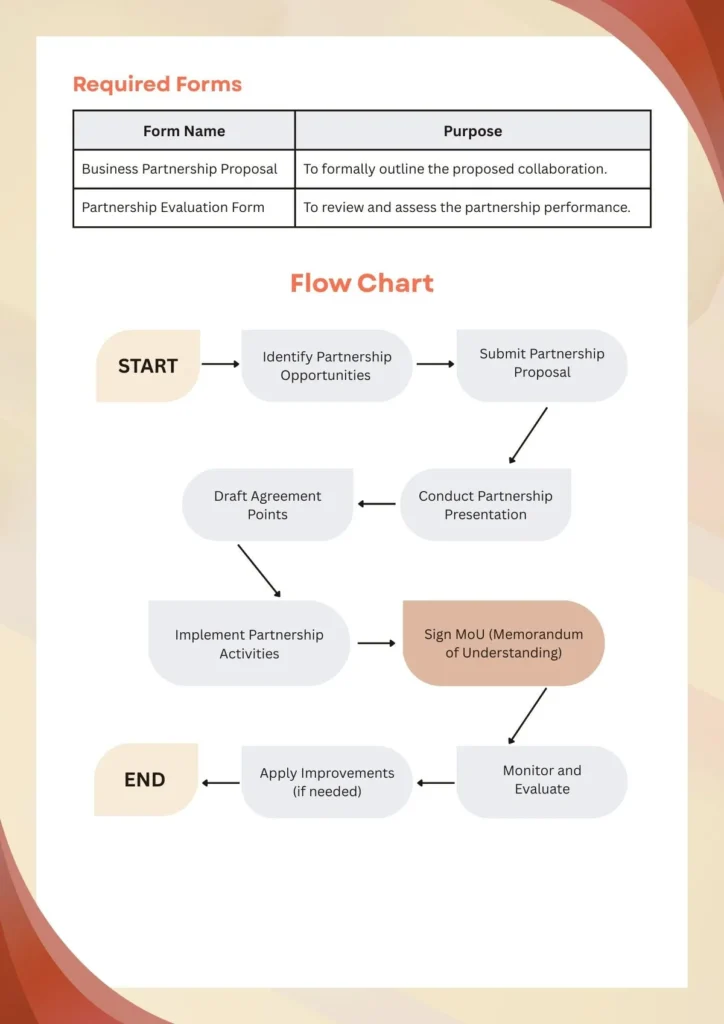
Different formats suit different levels of complexity. Here’s a breakdown of popular SOP types:
Step-by-Step (Simple SOPs)
Best for: Linear, repetitive HR tasks that follow a single path.
Example: “How to download and generate a payslip in the HRMS system.”Hierarchical SOPs
Best for: Processes involving different actions depending on role, seniority, or case type.
Example: “How to process expense claims — employee vs. manager vs. finance team.”Flowchart SOPs
Best for: HR workflows with decision points, exceptions, or multiple outcomes.
Example: “Leave approval SOP — how to handle overlapping requests or blackout periods.”Video SOPs
Best for: Visual, high-engagement formats — especially for onboarding, training, or complex tools.
Example: “Walkthrough of the new HR portal for benefits enrollment.”
Video SOPs are particularly effective in hybrid or remote setups, helping reduce misunderstandings and improve adoption.
Challenges of Developing Standard Operating Procedures (SOPs) — Especially for HR Teams
While Standard Operating Procedures are critical for consistency, compliance, and clarity, they come with a set of challenges that HR, Operations, and IT teams must navigate. For HR in particular, the impact of weak or scattered SOPs can affect everything from onboarding to legal compliance.
1. Creating SOPs Takes Time — and HR Is Always on the Clock
Drafting well-structured SOPs demands significant time and attention to detail, which many HR teams simply don’t have. Caught up in daily tasks like hiring, resolving employee issues, and navigating compliance updates, documentation often gets pushed aside. Unfortunately, the absence of SOPs becomes glaring only when something goes wrong, like a mishandled grievance or a missed onboarding step.
2. Too Much or Too Little Detail — a Common HR Pitfall
HR SOPs need to strike a tricky balance: they must be detailed enough to cover legal and procedural accuracy, yet simple enough for non-HR employees to follow. Overly technical documents overwhelm managers, while vague SOPs leave too much room for interpretation, leading to inconsistencies in how policies are applied across departments or locations.
3. Resistance to Change — Especially from Managers and Long-Timers
Many HR teams struggle with employees—especially senior staff—who are used to “the way we’ve always done it.” Introducing SOPs can feel like red tape or bureaucracy. Gaining buy-in means not only rolling out SOPs but also educating teams on their value, demonstrating how SOPs reduce errors, improve fairness, and free up time for more strategic HR work.
4. Document Sprawl — HR Policies Scattered Across Platforms
From hiring checklists in Google Docs to performance review templates in Excel and policy manuals buried in the company intranet, HR SOPs often live in too many places. This disorganisation leads to confusion, outdated references, and non-compliance. Worse, during audits or legal disputes, not knowing which version is current can be risky and costly.
5. Lack of Integration with Daily Workflows
Even the best-written SOPs are useless if no one follows them. For HR, this means embedding procedures into tools that teams already use—like integrating onboarding steps within HRIS systems or providing just-in-time access to disciplinary procedures in chat platforms like Slack or Microsoft Teams. Making SOPs searchable and accessible directly in the flow of work ensures they’re actually used.
Related: How Does Employee Self-Service Improve HR Efficiency?
Example Use Cases of SOPs by Industry

SOPs are essential for streamlining processes, reducing risk, and scaling operations. Here’s how different industries apply them:
Human Resources: In HR, SOPs are crucial for maintaining consistency in people processes. They are used to define hiring and recruitment procedures, guide benefits enrollment, document disciplinary actions, and implement remote work policies. These SOPs ensure compliance and fairness while improving efficiency across the employee lifecycle.
Healthcare: In the healthcare sector, SOPs are vital for safety and compliance. They guide infection control procedures, outline patient data handling protocols, standardize emergency room workflows, and ensure proper medicine storage and disposal. These processes help reduce errors and improve patient care outcomes.
Manufacturing: Manufacturing operations rely heavily on SOPs to maintain safety, quality, and productivity. SOPs cover equipment maintenance schedules, safety drills and incident reporting, quality assurance inspections, and machine calibration instructions. Standardizing these tasks minimizes downtime and ensures regulatory compliance.
Finance & Accounting: In finance and accounting, SOPs bring order to complex workflows. They are used to define reimbursement approval processes, manage month-end closings, handle tax filing and documentation, and support budget tracking and internal audits. This reduces errors and keeps financial operations audit-ready.
IT & SaaS: IT and SaaS companies use SOPs to maintain secure and efficient systems. SOPs govern user provisioning and deactivation, outline incident management procedures, define system backup protocols, and map out software deployment steps. They help ensure operational stability and data security.
Customer Service: Customer service teams leverage SOPs to deliver consistent support experiences. These include guidelines for handling escalations, templates for live chat resolutions, step-by-step product return procedures, and structured methods for survey and feedback collection. SOPs in this space drive customer satisfaction and team accountability.
Standard Operating Procedure (SOP) Examples for HR Teams
Standardized processes help HR teams maintain consistency, reduce errors, and improve compliance. Here are two detailed HR-focused SOP templates you can adapt:
SOP Template: Annual Performance Review Process
Title: Performance Review SOP for Full-Time Employees
Purpose: To ensure consistent and timely evaluations that align with organizational goals.
Scope: Applies to all full-time employees across departments.
Tools Required: HRIS platform, performance review templates, goal-setting worksheets
Step-by-Step Process:
HR notifies employees and their managers 4 weeks in advance of the review cycle
Employees complete a self-evaluation form
Managers schedule and conduct one-on-one review meetings
Performance is rated using a standardized competency rubric
Managers submit final evaluations to HR for review
HR processes performance-based bonuses, promotions, or development plans
SOP Template: Employee Data Backup & Access Protocol
Title: Weekly HR Data Backup & Security SOP
Purpose: To protect sensitive employee information and ensure data integrity.
Scope: HR team and IT administrators with access to employee records
Tools Required: Secure cloud storage (e.g., AWS), backup automation tools, access logs
Step-by-Step Process:
HR confirms all recent employee records and updates are synced with the HRIS
IT initiates automated data backup process
Completion of the backup is verified via activity logs
Backup is stored securely in an encrypted cloud environment
HR documents the backup status in the compliance tracker and flags any discrepancies
Related: How to Choose the Right HR Chatbot for Your Business
Why You Should Consider a Knowledge Base for Your SOPs
Creating SOPs is only the first step. Storing them in a usable, centralized, and intelligent system is what drives long-term impact.
A knowledge base gives your team one place to find, use, and trust your SOPs.
Here’s why Winslow recommends hosting your SOPs in a modern knowledge base:
Easily Searchable
Employees don’t want to dig through folders or email threads. With Winslow, they can ask a simple question and get SOP-guided answers instantly.Always Up to Date
Assign document owners, get reminders for periodic reviews, and update SOPs easily with version history.Embedded in Workflow Tools
Winslow integrates with Slack, Teams, email, and your intranet, so employees get SOP answers where they already work.AI-Powered SOP Access
Winslow’s AI HR Chatbot doesn’t just link to the SOP—it summarizes, guides, and explains steps in plain English. Need to apply for FMLA or onboard a contractor? Just ask Winslow.Analytics & Insights
Winslow tracks SOP usage to show which documents are accessed most, which steps create confusion, and where updates are needed.
Ready to Make Your SOPs Smarter?
Winslow makes it easy to store, access, and act on your SOPs. No more outdated PDFs or scattered documents—just clear, AI-powered answers for every team.